
Google Ads (formerly AdWords, also known as pay-per-click (PPC) or paid search,) remains one of the most popular and effective advertising platforms out there. It helps businesses sell products, increase brand visibility, and drive traffic. With buying intent at the heart of Google’s targeting, your business must show up when your customers are actively searching for solutions. However, with constant updates to the platform (especially as AI and automation take center stage), Google Ads has evolved, and your paid search campaigns need to evolve with it.
So, ready for takeoff? Here's your quick-and-clear guide to the Google Ads lingo you need to launch with confidence!
Google Ads Campaign Setup
1. Campaign Types
A Google Ads campaign is the overall structure you create to organize and run your ads on Google. Each campaign should focus on a specific goal, like getting more website visitors, sales, or leads, and contain settings such as budget, location targeting, and audience.
Within a campaign you’ll create ad groups and ads that work together to reach the right people at the right time. Think of it as the “home base” for all the ads tied to one specific marketing objective.
Search Campaigns
Google Ads search campaigns feature traditional text ads that appear on Google’s search results page when a user types in a relevant query. These ads are ideal for targeting users who are actively searching for specific products, services, or solutions, making them great for capturing high-intent traffic.
By selecting relevant keywords, you can ensure your business shows up when customers are ready to take action, whether it’s making a purchase, signing up for a service, or seeking more information.
Best Used For: Businesses looking to reach customers who are actively searching for specific products, services, or solutions.
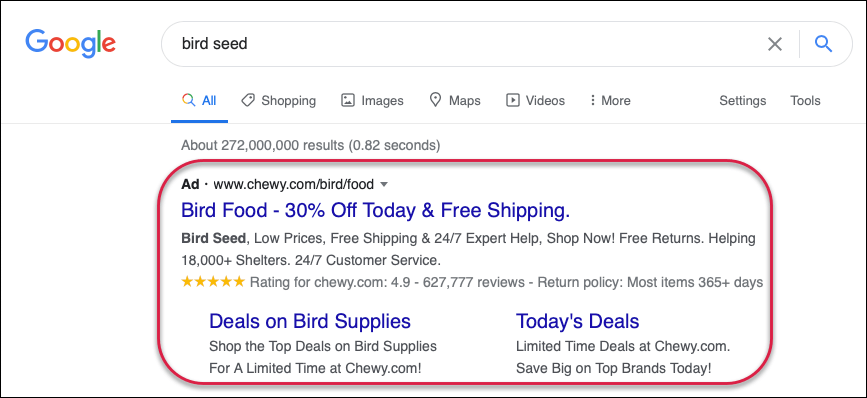
AI Max For Search Campaigns [Beta]
Google’s new Search Max campaigns are a simpler, AI-powered way to run search ads without needing to worry about long keyword lists. Instead of you choosing every keyword your ad should show up for, you just give Google the basics—like your business goals, headlines, descriptions, and a sense of your target audience. From there, Google’s AI figures out when and where your ad should appear, automatically matching it to the right searches and optimizing bids in real time. This makes it easier for businesses to reach more potential customers and get better results, without having to manage all the details that traditional search campaigns require. These ads appear as regular search ads on Google.
Best Used For: These ads are ideal for businesses that want to capture demand quickly, allowing Google’s AI to do most of the heavy lifting.
Performance Max Campaigns
Performance Max (or “PMax”) campaigns have replaced Smart Shopping campaigns, offering a more advanced, AI-driven approach to driving sales across all Google platforms. Unlike regular Shopping Campaigns, which focus solely on showcasing product listings in search results, Performance Max uses a variety of ad formats, including Display, YouTube, and Gmail, to reach customers across Google's entire network. This allows for broader reach and more automated optimization, while still leveraging product data from the Google Merchant Center.
CHANGE IMAGE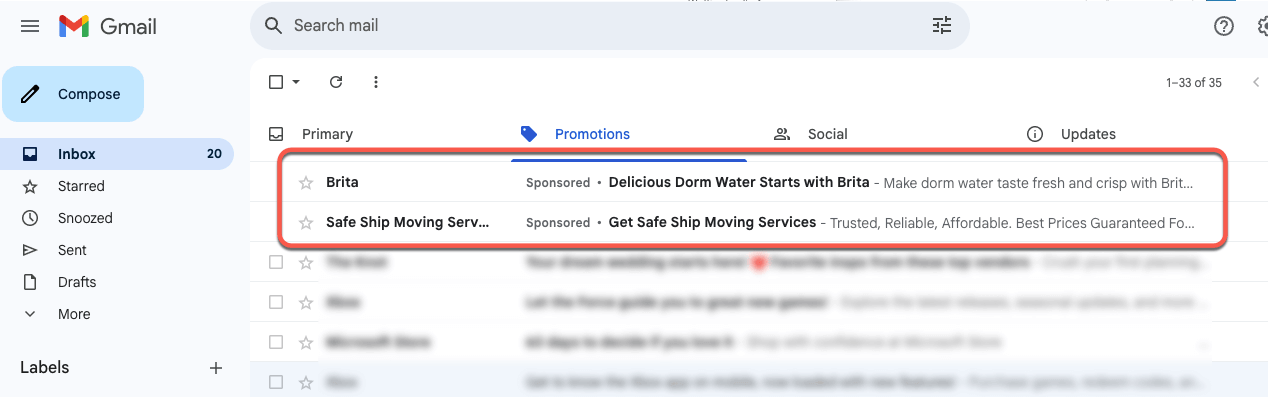
Above is an example of a PMax Gmail ad
Best Used For: Performance Max campaigns are best for businesses that want to maximize conversions by reaching customers across all of Google’s channels—like Search, YouTube, Display, Maps, and Gmail—with one AI-driven campaign.
Demand Gen Campaigns
Combines image and video ads, now part of the latest focus for Google as a video-first ad format, targeting the right audience across YouTube, Gmail, and Discover. Unlike Performance Max, which optimizes across all Google properties with a focus on conversions, Demand Gen is geared towards capturing demand earlier in the funnel, focusing on interest and awareness rather than direct sales.
Best Used For: Demand Gen campaigns are best used for driving interest and consideration by reaching new audiences with visually engaging ads across YouTube, Discover, and Gmail.
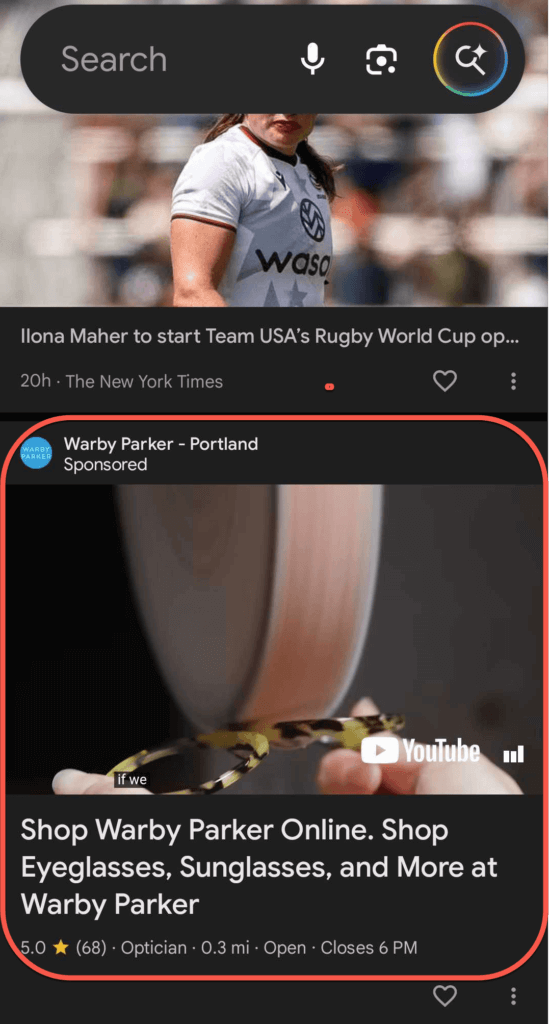
Above is an example of a Discover feed ad in a Demand Gen campaign
Display Campaigns
Google Ads display campaigns show visual ads (such as banners, images, or rich media) across Google’s Display Network, a massive collection of websites, apps, and videos that partner with Google to display ads.
These ads are designed to grab attention and build brand awareness by reaching users while they’re browsing their favorite websites or apps. Display Campaigns are particularly effective for targeting potential customers earlier in the sales funnel and for retargeting users who have previously interacted with your website or ads.
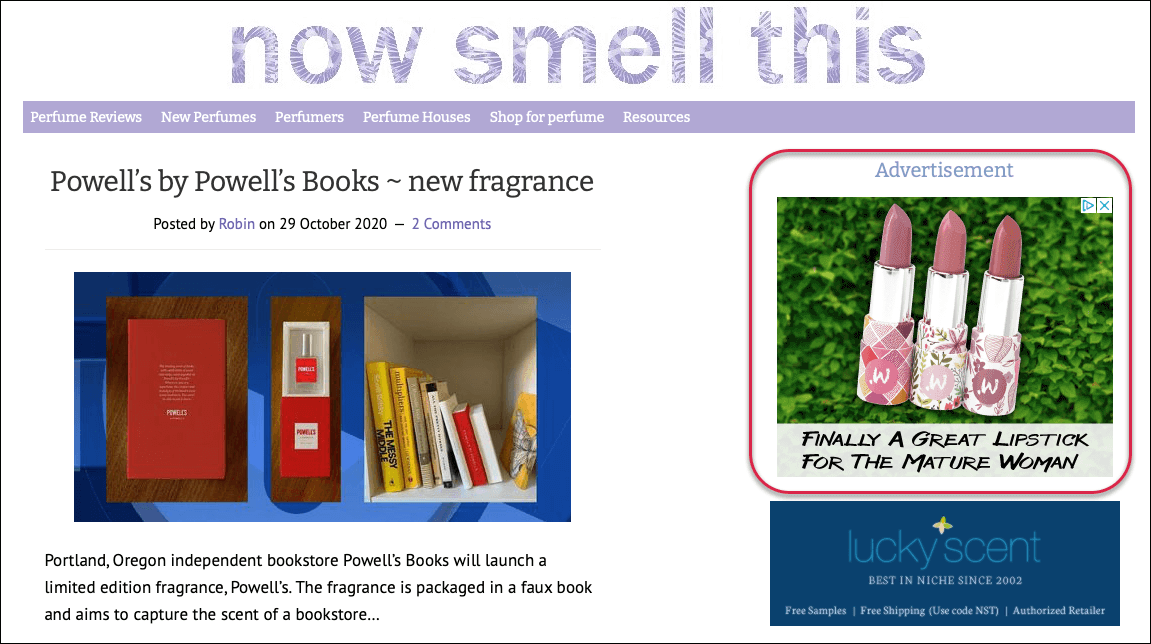
Best Used For: Building brand awareness, retargeting visitors, and reaching new potential customers across a variety of sites.
Shopping Campaigns
Shopping Campaigns are tailored for e-commerce businesses, featuring product images, prices, and detailed product information. These ads are directly linked to your Google Merchant Center, which syncs with your online store to showcase relevant products to users searching for similar items.
Shopping Campaigns help to drive conversions by presenting potential customers with visually engaging ads that match their search queries, making it easier for users to view and purchase products directly from the ad.
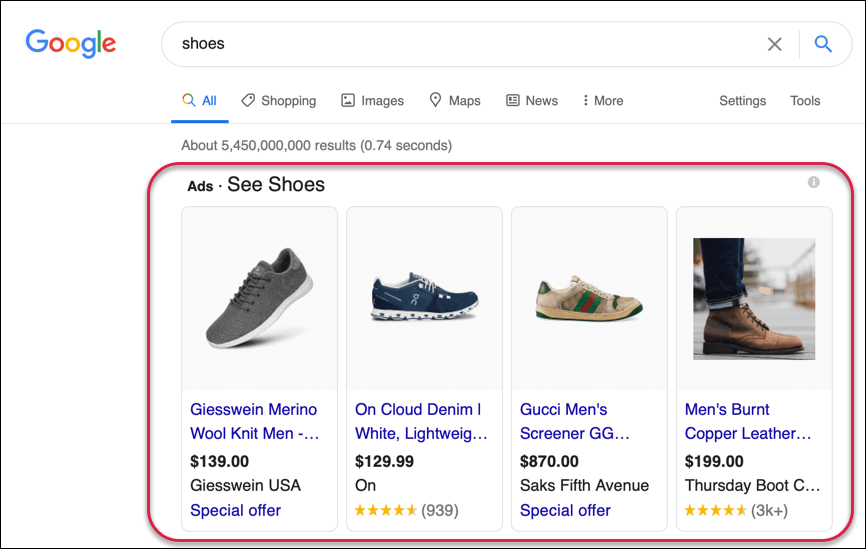
Best Used For: Retailers who want to promote specific products and drive sales directly from search results.
Video Campaigns
Video Campaigns are ads that run on YouTube and other partner sites across the Google Display Network. Video ads are highly engaging and work well for building brand awareness, educating customers about a product, or showcasing testimonials. They are also great for reaching a wide audience and delivering more personalized, story-driven content.
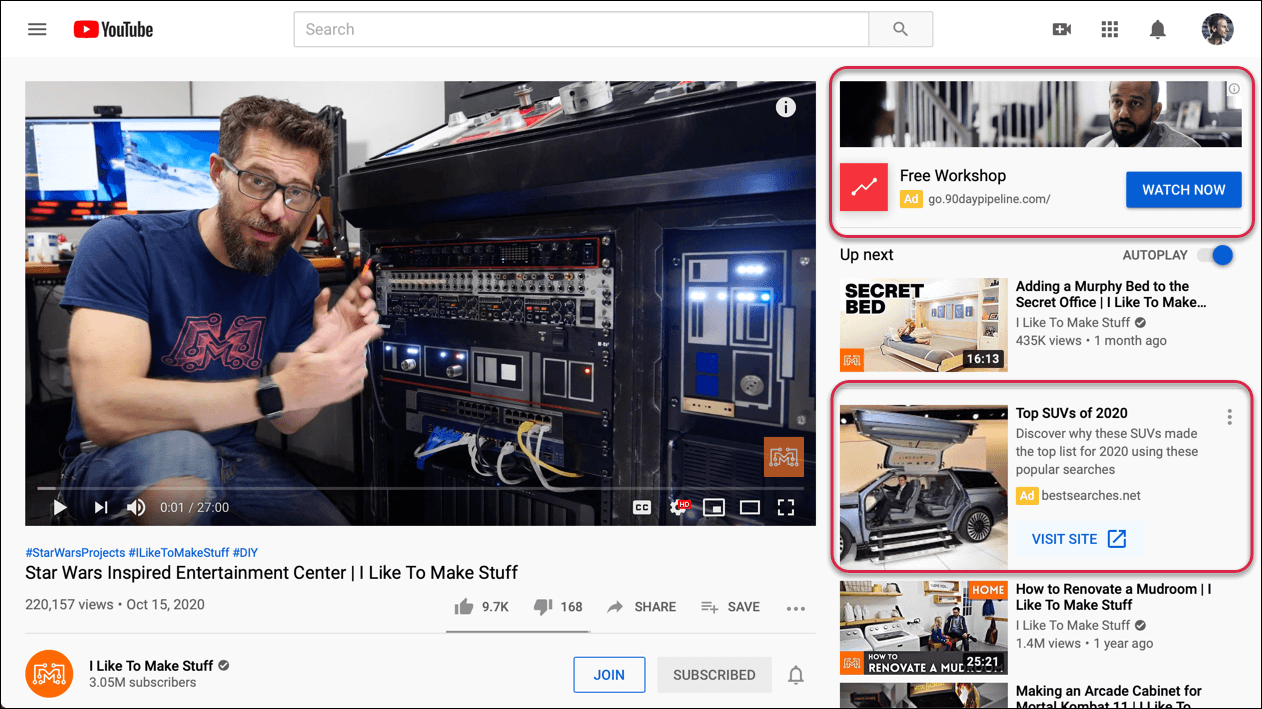
Best used for: Building brand awareness and engaging audiences by telling your story in a visual, memorable way.
App Campaigns
App Campaigns are specifically designed to promote mobile apps across Google's vast ecosystem of properties, including Search, YouTube, Play Store, and the Display Network. These campaigns automatically optimize ads using your app’s information to target users who are most likely to install the app or engage with it. App campaigns can include ads in the form of text, image, or video, and Google’s machine learning helps drive more efficient results by automating bid strategies and targeting.
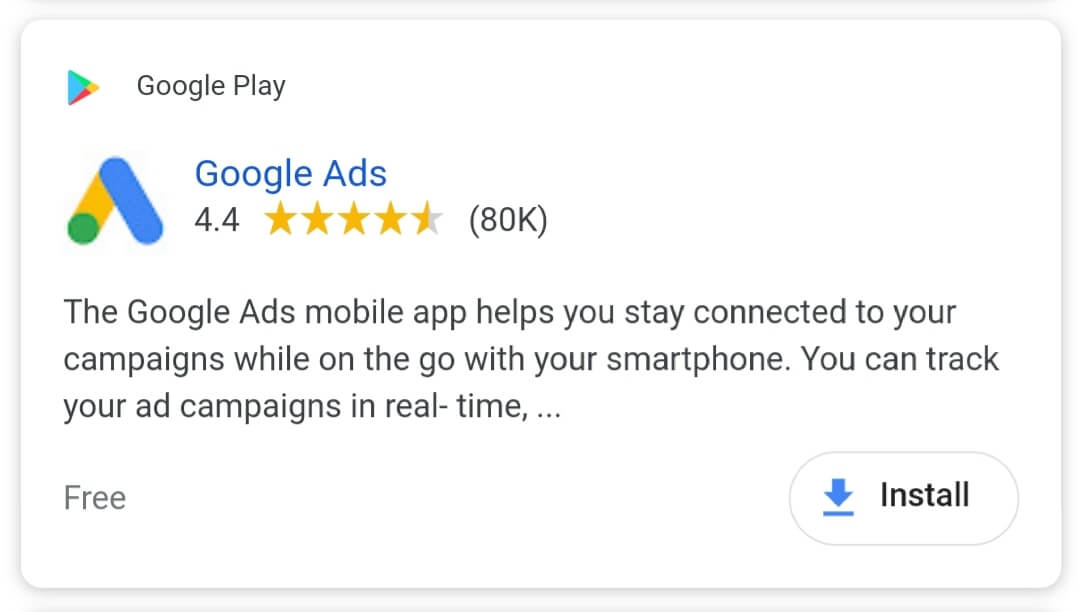
Best Used For: Promoting mobile apps and driving app installs or in-app actions across Google’s platforms.
Learn more about the different Google Ads campaign types here.
2. Conversions
A conversion in Google Ads happens when someone clicks your ad and then completes an action of your choosing, such as making a purchase, submitting a contact form, or downloading a guide.
Smaller actions like newsletter sign-ups or page visits are micro conversions. These help you understand early engagement, but should not be your only focus. It’s important to properly set up conversion tracking in Google Ads (and using other tools like Tag Manager, GA4, and the more recent G Tag) to ensure data accuracy.
3. Keywords
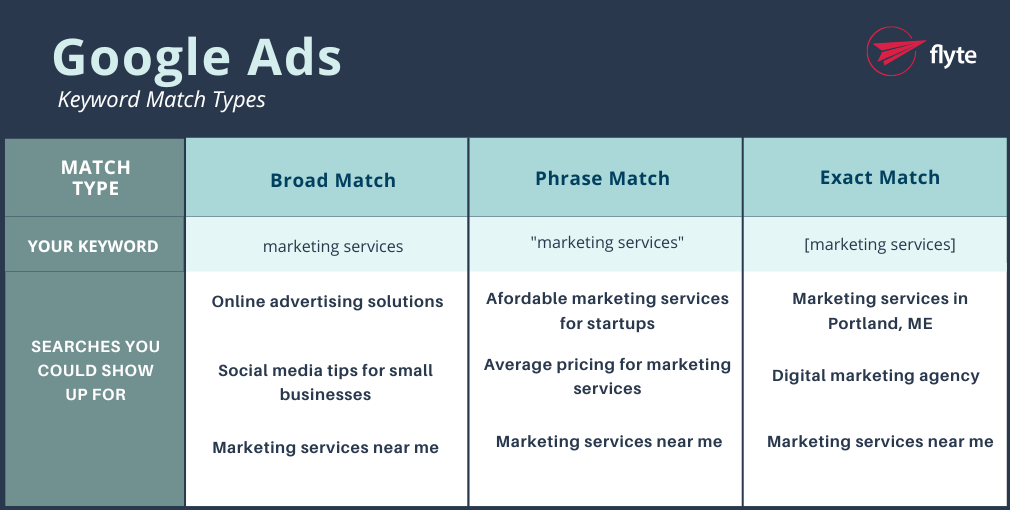
Keywords are the words and phrases that determine when your ads appear based on user searches. Keywords are divided into the three match types below:
- Exact match: Exact match shows your ads only for searches that share the same meaning or intent as your chosen keyword. This option offers the highest level of control over who sees your ad, but it will capture fewer searches compared to phrase or broad match. To set an exact match keyword, place it inside square brackets, for example, [marketing agency].
- Phrase match: With phrase match, your ads can appear for searches that contain the meaning of your keyword, even if the wording is slightly different or more specific. This allows you to capture more traffic than exact match while keeping your targeting narrower than broad match, ensuring your ads show for searches closely related to your product or service. To use phrase match, place quotation marks around your keyword, for example, “marketing agency”.
- Broad match: This match type allows your ads to appear for searches related to your keywords, even if the exact words are not included. Broad match can help you reach a wider audience, reduce time spent building keyword lists, and focus budget on what performs best. Google considers factors like recent searches, your landing page content, and other ad group keywords to match your ads with relevant searches. Broad match keywords are not designated with any special symbols.
4. Google Ads Assets
IGoogle Ads assets (formerly ad extensions) are handy add-ons that make your ads more clickable and compelling—without costing extra. They help improve visibility, give potential customers more reasons to click, and can boost performance without increasing your cost per click.
Types of Google Ads Assets
- Sitelink Assets: Sitelinks allow you to display links to pages outside your ad’s landing page, like links to your blog library, “About Us” page, events pages, etc.
- Call Asset: With more and more people searching on smartphones, click to call saves users time and lets them contact you right from your ad.
- Callout Asset: What makes you stand out? Use examples like “Free shipping,” “24hr customer service,” and other unique aspects of your business. Consider this your elevator pitch in bullet form.
- Location Asset: Connect directly with your Google My Business location and display your address, distance from the user’s location to your address, or mapped directions to your address.
- Structured Snippets: Google provides 13 header options like “Amenities”, “Brands”, and “Courses” that highlight specific aspects of your products/services, which you’re able to follow with a short list of custom values you choose.
- Price Asset: Showcase your specific products and pricing within your ad by clicking on these Assets your customers are taken directly to the product/service.
- Message Asset: Allows users to message you directly from your ad
- Promotion Asset: Display your business’s special sales and offers.
- Affiliate Location Asset: Designed for those who sell their products through retail chains, these assets help users find nearby stores that sell those products.
- App Asset: Advertise your downloadable app to prospects.
- Lead Form Asset: Enables users to provide their contact information directly through your ad, allowing you to collect leads directly.
- Image Asset: Display a small photo next to your text ad on the SERP.
- Headline & Description Assets: Assets give you the ability to associate up to 3 headlines and 2 description assets at the campaign level.
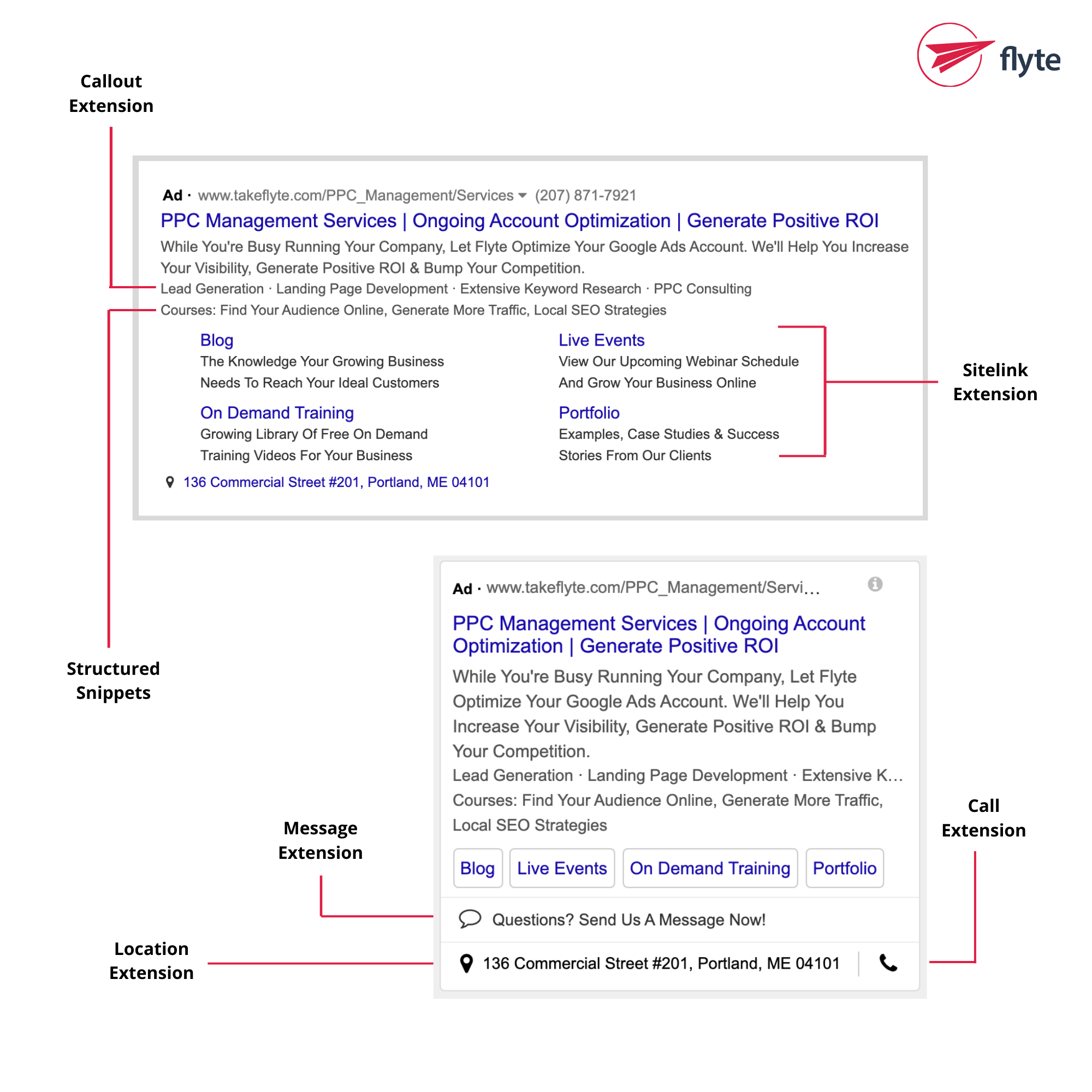
Read our blog post all about Google Ads asset types here.
Ongoing Optimization for Google Campaigns
5. Bidding Strategies
In Google Ads, a bidding strategy is the approach you choose to decide how Google should spend your budget to get the results you want. Each Google Ads bidding strategy focuses on a different advertising goal, such as driving sales, increasing website traffic, or boosting brand visibility. Choose the right type of bidding strategy to ensure your budget works toward your specific objectives.
Types of Bidding Strategies
- Conversion-Focused Bidding: Designed to get the most sales, leads, or other valuable actions for your budget. Google automatically adjusts your bids to target users who are more likely to take the action you want.
- Click-Focused Bidding: Prioritizes driving as many clicks as possible to your website. This can be a good option if your main goal is to increase traffic or gather data for future campaigns.
- Impression-Focused Bidding: Aims to show your ads to as many people as possible to boost brand awareness. These strategies often focus on getting your ads in high-visibility placements.
- Engagement-Focused Bidding: Optimizes for interactions like video views, ad clicks, or engagement with interactive formats, often used in video or display campaigns.
- Manual Bidding: Gives you full control over how much you bid for clicks or impressions, allowing you to fine-tune performance based on your own data and goals.
Choosing the bidding strategy that suits your goals and your business is crucial to the success of your Google Ads campaign. For a deep dive and additional expert advice, this guide will help.
6. Negative Keywords
Negative keywords function just like regular keywords—but in reverse. Instead of telling Google which search terms you want your ads to appear for, you're telling it which ones to avoid.
While you can add some broad negative keywords right away, most are added over time as you review the search terms triggering your ads and refine accordingly. Common examples include terms like “free,” “cheap,” competitor names (unless you’re intentionally running a Competitor Campaign), and the five W’s—“who,” “what,” “where,” “when,” and “why”—which typically indicate informational rather than commercial intent.
Google Ads negative keywords will vary by industry, but the examples above are often low-converting and worth filtering out early.
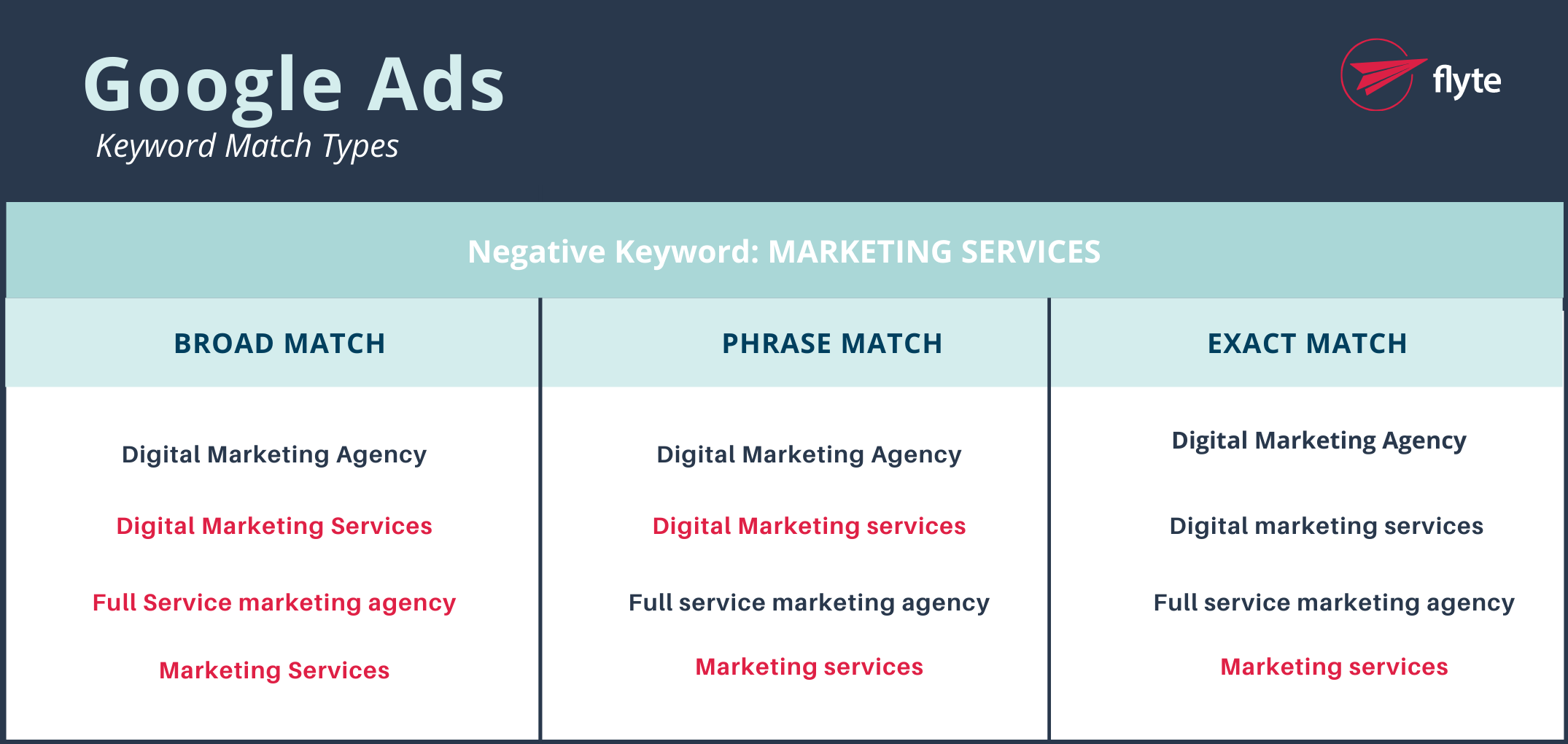
*Terms in red represent searches that would not trigger an ad to show
Reporting on Google Ad Campaigns
Reporting allows you to see just how well your ads have been performing, and what areas need attention.
7. Impressions
These refer to the number of times your ad is shown on a search result page or another site within the Google Network. An impression is counted each time your ad appears, even if the user doesn’t click on it.
8. Click-through-rate
Click-through rate (or “CTR”) is a vital metric to the success of your PPC campaign, and measures the rate at which users click your ads compared to the number of times the ad is viewed. CTR is calculated using this formula:
CTR = (Clicks on ad) / (Total Impressions)
9. Quality Score
Google Ads Quality Score is a 1–10 rating that measures the relevance and quality of your keywords, ads, and landing pages. It’s based on three main factors:
- Expected Click-Through Rate (CTR) – How likely your ad is to get clicked when shown.
- Ad Relevance – How closely your ad matches the user’s search intent.
- Landing Page Experience – How useful and user-friendly your landing page is for people who click your ad.
A higher Quality Score can:
- Lower your cost-per-click (CPC)
- Improve your Ad Rank
- Help your ads appear more often and in better positions
In short, Google rewards advertisers who create helpful, relevant, and trustworthy ad experiences with better performance and lower costs.
10. Ad Rank
Google Ad Rank is the value Google uses to determine where your ad appears on the search results page—and whether it shows up at all.
It’s calculated using a mix of factors, including:
- Your keyword bids (how much you're willing to pay per click).
- Ad Assets and formats like site links or call buttons.
- Context of the search, such as location, device, time, and competition.
- Your quality score.
Even if you bid more than a competitor, your ad won’t necessarily rank higher—a strong Quality Score can help you outrank competitors while paying less per click.d
So, What Next?
If you’re feeling like you’ve got a solid grasp on the realm of PPC–go ahead and dive in!
Looking for some additional guidance before getting started? Here are a few resources:
- How to Use Google Ads: A Crash Course
- The Last Guide to Google Ads Account Structure You’ll Need
- Your Guide to Google Ads (by Google)
- 8 Expert Tips to Improve Your Landing Pages
Not sure where to start—or just want to get it right the first time? Let’s talk. We’ll help you set up, optimize, and take off with a campaign that actually converts. Let’s set up a time to chat!

This article was written by the flyte crew: experts in branding, web design, and digital marketing. Reach out and we'll help your business take flyte!